
Average Typing Speed by Age: WPM Benchmarks for Kids, Students, and Adults
You finish a typing test, look at the result, and see 38 words per minute.
Your first thought may be, “Is that good or slow?”
The answer depends on who took the test. A 38 WPM score is impressive for an elementary student. It is solid for a teenager and close to the general average for an adult.
Typing speed becomes confusing when every website gives a different number. One chart says 40 WPM is average, while another says students should reach 60 WPM. Neither number means much without considering age, experience, accuracy, test length, and keyboard use.
A child who started using a laptop last month should not compete with an adult who writes reports every day. Likewise, an adult who types occasionally should not compare their result with a professional transcriptionist.
This guide explains realistic typing speed benchmarks for children, students, and adults. It also shows how to measure your real speed and improve it without sacrificing accuracy.
Quick Average Typing Speed by Age Chart
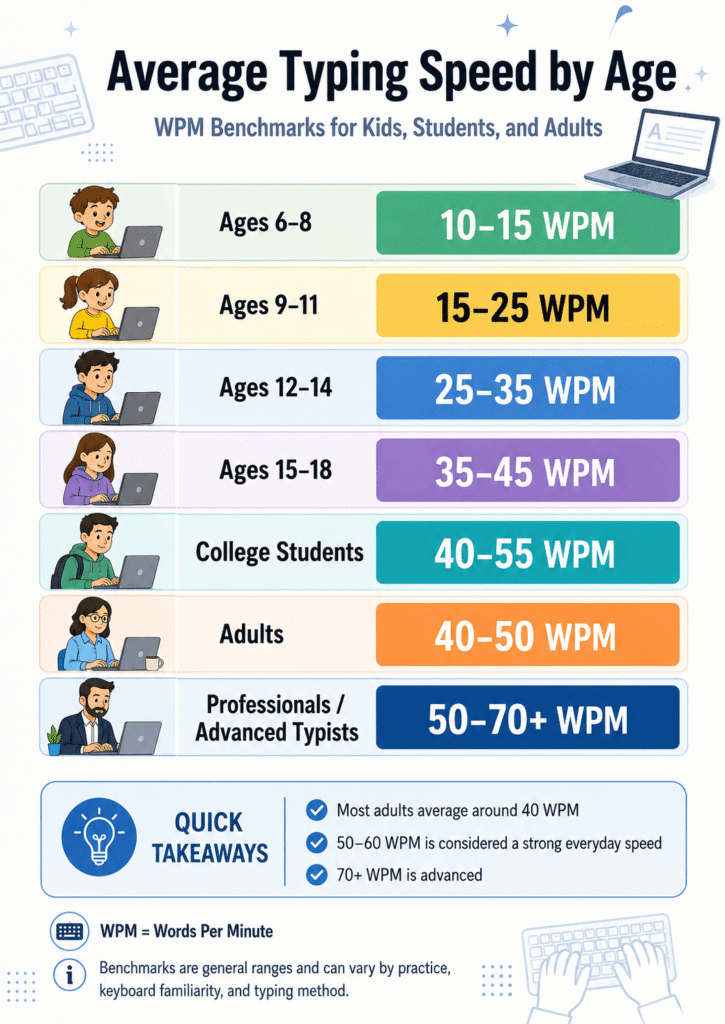
The following ranges provide practical reference points rather than strict passing scores. Schools, teachers, typing platforms, and employers may use different standards.
| Age or education level | Typical typing speed | Useful accuracy goal |
|---|---|---|
| Ages 5–7 | 2–10 WPM | 80% or higher |
| Ages 8–10 | 8–20 WPM | 85% or higher |
| Ages 11–13 | 20–30 WPM | 90% or higher |
| Ages 14–17 | 30–40 WPM | 95% or higher |
| College students | 40 WPM or higher | 95–98% |
| General adult typists | Around 40 WPM | 95–98% |
| Fast office typists | 60–80 WPM | 97–99% |
| Advanced typists | 80–100+ WPM | 98% or higher |
Typing.com publishes similar grade-level guidance. It lists approximately 8–20 WPM for elementary students, 20–30 WPM for middle school students, 30–40 WPM for high school students, and at least 40 WPM for college students and adults. The platform also recommends increasing accuracy targets as students advance through school.
These numbers should help you set a realistic target. They should not make a learner feel behind. Previous training, keyboard familiarity, motor skills, language, device type, and regular practice can create large differences between people of the same age.
What Does WPM Actually Measure?
WPM means words per minute. Typing tools normally treat five characters as one standard word. Spaces and punctuation may also count as characters.
For example, suppose you type 200 characters in one minute:
200 characters ÷ 5 = 40 WPM
Your gross speed counts everything you typed. Your net speed may remove mistakes from that result.
This difference matters. Someone can produce 65 gross WPM while making enough mistakes to reduce their usable speed to 50 WPM.
Before comparing your score with an age benchmark, take a free typing speed test and check both WPM and accuracy. Do not judge your ability from speed alone.
Average Typing Speed for Kids Ages 5 to 7
Young children usually begin by finding individual letters. They may use one finger, switch hands randomly, and look between the screen and keyboard after every keystroke.
That is normal.
A speed between 2 and 10 WPM can represent healthy progress at this age. Recognizing keys and typing correctly matters more than racing against a timer.
Parents sometimes make the mistake of introducing difficult paragraphs too early. The child then spends more time searching for punctuation than learning basic keyboard positions.
Short exercises work better. A beginner can practice:
- Writing their name
- Typing simple three-letter words
- Finding letters without time pressure
- Using the space bar correctly
- Learning the backspace and shift keys
- Keeping both hands near the keyboard
Sessions should stay short. Five to ten minutes usually feels more manageable than a long lesson.
Games can also make keyboard practice less intimidating. The site’s guide to fun typing games for kids includes age-friendly ideas for making practice feel less like homework.
Average Typing Speed for Kids Ages 8 to 10
Children in this group often use computers for classroom assignments, online learning, research, and simple presentations. Many begin developing repeatable finger habits.
A practical typing range is about 8 to 20 WPM.
Some trained children may go faster. Others may stay below 10 WPM while they learn proper technique. Both situations can be normal.
At this age, a child should focus on three things:
- Using more than one or two fingers
- Looking at the screen more often
- Reaching at least 85% accuracy
A child who types 12 WPM with 94% accuracy usually has a stronger foundation than one who reaches 22 WPM with constant errors.
The slower learner can gradually build speed. The inaccurate learner may first need to replace rushed habits.
Average Typing Speed for Middle School Students
Students between roughly 11 and 13 years old often type between 20 and 30 WPM.
This is also the stage when typing starts affecting real schoolwork. Students may need to write longer answers, prepare reports, complete online tests, and communicate through learning platforms.
Typing.com uses 20–30 WPM as a general middle-school range and suggests an accuracy target of at least 90%.
A middle school student at 25 WPM with 92% accuracy is developing normally. A student reaching 40 WPM with strong accuracy is already above the typical range.
However, regular computer use does not always produce good typing technique. Some students can navigate apps quickly but still type with two fingers while watching the keyboard.
Touch typing can help remove that limitation. It uses consistent finger zones so the typist can focus on the screen instead of searching for each key. New learners can start with this complete beginner’s guide to touch typing.
Average Typing Speed for High School Students
A realistic benchmark for high school students is approximately 30 to 40 WPM.
Students who complete essays, coding exercises, research projects, and online assignments every week may reach 50 WPM or higher. However, students who mostly use phones and tablets may have less physical-keyboard experience.
High school typing goals should reflect actual needs. A student preparing for computer-based examinations needs sustainable speed, not just a fast 15-second result.
For example, a student may reach:
- 55 WPM during a 15-second test
- 47 WPM during a one-minute test
- 40 WPM during a five-minute test
That drop does not mean the longer test is unfair. It shows the difference between burst speed and sustainable speed.
Use a one-minute typing test for a quick benchmark. Then take a five-minute typing test to check whether your speed and accuracy remain stable.
Average Typing Speed for College Students
College students generally need at least 40 WPM for comfortable academic work.
Many students type faster because they regularly write essays, take notes, communicate with instructors, conduct research, and complete online assessments. A range of 40–60 WPM with strong accuracy is useful for most academic tasks.
The real advantage does not come from finishing a paragraph a few seconds earlier. Faster, automatic typing reduces the attention spent finding keys.
That leaves more mental space for organizing ideas, checking arguments, and following the assignment.
However, writing speed and typing speed are not identical. A student may type 80 WPM during a copying test but write an original essay more slowly because composition requires thinking, revising, and choosing words.
Do not treat a copying-test result as a direct measure of writing ability.
Average Typing Speed for Adults
Around 40 WPM is widely used as a general adult typing benchmark. Typing.com also places the overall average close to 40 WPM.
Still, adult results vary more than most age charts suggest.
A person who writes only a few emails each week may type between 25 and 40 WPM. An office worker who uses a keyboard throughout the day may reach 50–70 WPM. Data-entry workers and transcriptionists may need even higher sustained speeds.
Age alone does not determine the result. Daily use, technique, keyboard type, health, familiarity with the test language, and years of experience often matter more.
That explains why an experienced older employee may easily outperform a younger adult who mainly communicates through a smartphone.
For a broader comparison of skill levels and job-related expectations, read what is considered a good typing speed.
Is 40 WPM a Good Typing Speed?
Yes. A result of 40 WPM is good enough for most everyday computer tasks.
At 40 WPM, you can usually handle:
- School assignments
- Emails and messages
- Basic office documents
- Online forms
- General web research
- Personal writing
- Routine administrative work
Reaching 50–60 WPM makes longer tasks more comfortable. Speeds above 60 WPM are commonly considered fast when accuracy remains high.
A result below 40 WPM is not a failure. It only means that improving technique could save time during keyboard-heavy tasks.
Accuracy Changes the Meaning of Your WPM
Consider two typists:
| Typist | Speed | Accuracy |
|---|---|---|
| Typist A | 65 WPM | 86% |
| Typist B | 52 WPM | 98% |
Typist A looks faster at first. However, that person may need to stop repeatedly, correct misspelled words, and reread unclear sentences.
Typist B produces cleaner work and may finish the complete task sooner.
Typing.com explains that 90% accuracy can mean roughly one incorrect character out of every ten. That error rate can create frequent mistakes across normal words and sentences.
For practical typing, aim for:
- 85% or higher for young beginners
- 90% or higher for middle school learners
- 95% or higher for high school students
- 97–98% or higher for adults and advanced typists
Speed usually improves after accurate movements become automatic. Learn more in the guide explaining why typing accuracy matters more than raw speed.
How to Measure Your Real Typing Speed
One lucky test does not show your real ability. A familiar passage, an easy word list, or a strong burst can temporarily increase the score.
Use this process instead.
Step 1: Use a Physical Keyboard
A phone or tablet uses different hand movements. Test on the device you normally use for school or work.
Step 2: Warm Up Briefly
Type for two or three minutes before recording your score. Cold hands and unfamiliar passages can affect the first attempt.
Step 3: Take Three One-Minute Tests
Record the WPM and accuracy from each attempt.
For example:
- Test one: 41 WPM
- Test two: 44 WPM
- Test three: 42 WPM
Your practical average is about 42 WPM.
Step 4: Complete a Longer Test
Take a two-minute or five-minute test. Longer tests reveal whether your accuracy falls when your hands become tired.
Step 5: Track Net WPM and Accuracy
Do not record only your fastest number. Keep both speed and accuracy in a simple notebook or spreadsheet.
Step 6: Retest Under Similar Conditions
Use the same keyboard, test duration, language, and difficulty. Otherwise, the comparison may not be fair.
How to Improve Typing Speed at Any Age
Typing is a trainable motor skill. Children, students, and adults can improve through consistent practice.
1. Fix Finger Placement
Place the left-hand fingers over A, S, D, and F. Place the right-hand fingers over J, K, L, and the semicolon key.
The raised marks on F and J help you return to the home row without looking down.
2. Slow Down Until Accuracy Improves
This feels frustrating at first. Your WPM may even decrease.
That temporary drop is normal. You are replacing random movements with repeatable movements.
Push for speed again after you can maintain about 95–98% accuracy.
3. Stop Looking at the Keyboard
Covering the hands with a light cloth can help break the habit. Another option involves using a blank keyboard cover.
Expect mistakes during the first few sessions. The goal is to teach your fingers to locate keys without visual help.
4. Practice for 10 Minutes Daily
Short, frequent practice usually works better than one long weekly session.
Try this routine:
- Two minutes of easy warm-up typing
- Three minutes of accuracy-focused practice
- Three minutes of normal sentence typing
- One one-minute speed test
- One minute reviewing mistakes
5. Practice Difficult Letter Patterns
Do not keep repeating only comfortable words.
Notice which combinations cause errors. Common problem patterns may include “th,” “ing,” “tion,” capital letters, numbers, or punctuation.
Type those patterns slowly until the movement feels natural.
6. Use Longer Tests Once a Week
Short tests train quick reactions. Longer tests develop rhythm and endurance.
A five-minute test can reveal problems that never appear during a 15-second attempt.
7. Track Weekly Averages
Daily scores change because of sleep, stress, focus, keyboard quality, and passage difficulty.
Compare weekly averages instead of worrying about one poor result.
For a more detailed training plan, follow these practical methods for improving your typing speed.
Common Typing Practice Mistakes
Chasing the Highest Possible WPM
Constantly rushing often trains mistakes instead of speed.
Your goal should be a repeatable score with strong accuracy.
Practicing Only Easy Words
Simple word lists can make your score look impressive. Real writing includes capitals, punctuation, numbers, and unfamiliar words.
Include natural paragraphs in your practice.
Changing Tests Every Day
Different platforms use different passages, word lists, and scoring methods. Switching constantly makes progress difficult to measure.
Choose one main test for weekly tracking.
Ignoring Posture
Tense shoulders, bent wrists, and a badly positioned keyboard can reduce comfort during longer sessions.
Keep your wrists neutral, relax your shoulders, and place the keyboard at a comfortable height.
Comparing Children With Adults
A child’s keyboard familiarity, hand size, reading level, and training history differ from an adult’s.
Compare a child with an age-appropriate range and their previous results.
Expecting Improvement Every Day
Typing progress rarely moves in a straight line. Your score may remain unchanged for several days before suddenly improving.
Look for progress across weeks, not individual sessions.
What Typing Speed Should You Aim For?
Choose a target based on what you need to accomplish.
For young children, accuracy and keyboard familiarity should come first.
Middle school students can work toward 25–30 WPM. High school students can aim for 35–45 WPM with at least 95% accuracy.
College students and adults should find 40–60 WPM comfortable for most academic and office tasks. People preparing for data entry, transcription, or fast customer-support roles may need 60–80 WPM or more.
Once your speed meets your practical needs, improving accuracy and endurance may help more than chasing a flashy score.
Frequently Asked Questions
What is the normal typing speed for a 10-year-old?
Many children around age ten type between 10 and 20 WPM. Training and keyboard experience can create large differences. Accuracy and correct finger habits matter more than reaching one exact number.
Is 30 WPM good for a student?
Yes. Thirty WPM is a strong result for many middle school students and a reasonable developing score for a high school learner.
Is 50 WPM good for a teenager?
Yes. A teenager who maintains 50 WPM with at least 95% accuracy is above common high school benchmarks.
Is 40 WPM slow for an adult?
No. Forty WPM sits close to the widely cited adult average and works well for general computer use.
Is 60 WPM considered fast?
Sixty WPM is above average for general typists. It is a useful speed for office work, academic writing, and many keyboard-heavy tasks.
Can adults improve their typing speed?
Yes. Adults can improve by correcting finger placement, reducing keyboard glances, practicing difficult patterns, and completing short daily sessions.
Should I count my highest typing score?
Use an average of several tests instead. Your highest result may represent a short burst rather than your sustainable speed.
Final Thoughts
A typing score only becomes useful when you place it in context.
For children, small improvements in accuracy and key recognition matter. Students need enough sustainable speed to complete assignments without fighting the keyboard. Adults usually benefit most from reaching a comfortable, accurate pace that matches their work.
Take several tests, calculate a realistic average, and record your accuracy. Then practice for a few minutes each day rather than chasing a new record in every session.
A steady 45 WPM with clean, controlled typing is far more useful than an occasional 70 WPM result filled with mistakes.
External Resources and References
The benchmark ranges in this guide use general educational guidance rather than universal pass-or-fail standards. Typing.com’s WPM and grade-level guide provides reference ranges for elementary, middle school, high school, college, and adult typists. Its article on typing speed for children offers additional context about technique and the commonly cited adult average. The OpenTextBC keyboarding guide explains touch typing and basic keyboard skills. These sources should serve as general references because individual results vary according to training, language, device, and experience.
