- Free · No Signup Required
Free Typing Speed Test Measure Your Typing Speed in Seconds
- Free · No Signup Required
- Real-Time WPM & Accuracy
- Downloadable Typing Certificate
- Works on All Devices
⏸ Test Paused
Click Resume or press Tab to continue
Your Typing Test Result
| DATE | WPM | ACCURACY | CONSISTENCY | KPS | MODE |
|---|
Test History (Last 10)
| DATE | WPM | ACCURACY | CONSISTENCY | KPS | MODE | CERT |
|---|
No test history yet. Complete a test to see your results here.
What Is a Typing Speed Test and How Does It Work?
A typing speed test measures how many words you can type correctly within a set time. The result is expressed as WPM words per minute and calculated using a simple formula: every five characters (including spaces) count as one word. Only correctly typed characters contribute to your score. Errors, backspaces, and paused time are excluded from the final WPM calculation to give you an honest, accurate result.
When you start a test on TypingSkillsTest, a passage of text appears on screen. Your job is to type it exactly as shown, as quickly and accurately as possible. The moment you begin typing speed test, the timer starts. When time runs out or when you finish the passage your results appear instantly:
- ✓ Words Per Minute (WPM)
- ✓ Typing Accuracy
- ✓ Correct Characters
- ✓ Mistyped Words
- ✓ Error Rate
- ✓ Consistency
No inflated numbers. No pauses counted as typing time. Just a clear, accurate snapshot of your real typing speed test performance.
What Is a Good Typing Speed? WPM Benchmarks by Skill Level
Most adults who use a computer regularly type between 35 and 45 WPM. If you type faster than that, you are already above average. But “good” depends on what you need your typing speed test for a data entry job has very different requirements than casual email writing.
Here is how typing speeds break down across skill levels and professional roles:
- 10–30 WPM
- 40–60 WPM
- 60–80 WPM
- 80–100 WPM
- 60–90 WPM
- 100+ WPM
Why Typing Accuracy Matters as Much as Speed
Many people focus entirely on WPM and ignore accuracy but speed without accuracy is almost useless in a real work environment. Consider this: a typist going at 80 WPM but making mistakes every few words produces output that has to be reviewed, corrected, and re-typed. The actual throughput is far lower than the raw speed suggests. Most employers, schools, and professional certifications measure both speed and accuracy together. A score of 60 WPM at 98% accuracy is more valuable in most situations than 80 WPM at 88% accuracy.
The rule most professional typists follow: accuracy first, always. Speed builds naturally on top of clean typing habits. Chasing speed before your accuracy is consistent leads to bad muscle memory that is genuinely difficult to unlearn.
How WPM Is Calculated The Formula Explained
Understanding the WPM formula matters because not all typing speed tests calculate it the same way. Some tools count every keystroke, including errors, which produces an inflated “gross WPM” figure. TypingSkillsTest uses net WPM the industry standard for professional and employment assessments which only counts correctly typed characters.
The net WPM formula:
Net WPM = (Total correctly typed characters ÷ 5) ÷ Minutes elapsed
The number 5 is the standard unit five characters equals one word, regardless of whether you typed short words like “a” or long ones like “immediately.” This standardization makes WPM scores comparable across different passages and test sessions.
Why pauses are excluded:
The timer on TypingSkillsTest measures active typing time. If you pause in the middle of a test, that pause time is not added to the total elapsed time in the calculation. This means your score reflects your actual typing performance, not how long you sat at the keyboard.
Gross WPM vs. Net WPM:
Gross WPM counts all characters typed, including errors. Net WPM subtracts the error penalty. The gap between the two scores is your error cost — the wider that gap, the more errors are dragging down your effective output. Most employers and certification bodies use net WPM.
- ✓ Total characters typed
- ✓ Correct characters
- Incorrect characters
- Time spent typing
- Accuracy percentage
This provides a balanced assessment of both speed and precision.
Choose the Right Typing Speed Test for Your Goal
Not every typing test serves the same purpose. A 15-second burst test tells you your peak speed. A 5-minute test reveals your stamina and whether your accuracy holds up over time. Here is how to choose the test that matches what you are trying to measure:
15-Second Typing Speed Test
Your Peak Burst Speed Want to know your absolute maximum speed? The 15-second test captures your fastest burst without the fatigue of a longer session. This is useful as a warm-up before longer tests and a satisfying way to see how high your peak WPM can go.
30-Second Typing Speed Test
Quick and Balanced: The 30-second typing speed test is a middle ground, fast enough to stay focused, long enough to smooth out lucky streaks. It is a good choice for daily quick-checks when you want a meaningful result without investing a full minute.
1-MinuteTyping Speed Test
The Standard Benchmark The 1-minute typing speed test is the most widely used format in employment assessments, school evaluations, and professional certifications. It is long enough to measure real speed but short enough to repeat several times in a practice session. Most people use the 1-minute test as their primary progress tracker.
2-Minute Typing Speed Test
Steady-State Speed Two minutes is long enough for your typing speed test to settle into a comfortable rhythm. Where the 1-minute test measures burst performance, the 2- minute test is closer to your sustainable working speed.
5-Minute Typing Speed Test
For Job Applications and Hiring Employers who include a typing assessment in their hiring process typically use a 5-minute test. The longer duration reveals whether a candidate's accuracy breaks down under sustained pressure a fast 1-minute score can look very different after five minutes. If you are preparing for a job interview, practice with the 5- minute format
10-Minute Typing Speed Test
Professional Endurance The 10-minute test is the longest available and the closest to real-world sustained typing speed test conditions. It exposes fatigue, consistency issues, and accuracy drift under extended use. Professional typists preparing for certification or high-volume data entry roles should regularly use this format.
What Typing Skills Test Measures Features and Metrics Explained
A good typing speed test gives you more than just a number. Understanding what each metric means helps you identify exactly where to focus your practice.
Real-Time WPM Tracking
Your words per minute counter updates live as you type. This lets you see whether you are maintaining a steady pace or losing speed toward the end of a test. Most people slow down significantly in the final 20% of any timed session.
Net Accuracy Score
Accuracy is calculated from correct keystrokes as a percentage of all keystrokes. A backspace that corrects an error improves your final accuracy, but the original error is still recorded. This gives you both an honest final score and a complete picture of where mistakes occurred.
Error Count and Heat Map
Every incorrect keystroke is logged and displayed. After the test, the error heat map shows which specific keys caused the most problems — letters, numbers, punctuation, and bracket characters are all tracked individually. This is the fastest way to identify exactly which keys to practice.
Downloadable Typing Certificate
After completing any test, you can enter your name and download a personalized typing speed test certificate as a PDF or PNG. The certificate shows your WPM, accuracy, test duration, and date — ready to include in a job application, student portfolio, or LinkedIn profile.
Multiple Test Modes
Common words, quote passages, code snippets, numbers, and custom text are all available as test modes. Switching between modes keeps practice varied and helps build typing speed test versatility across different character sets.
No Account Required
Every feature on TypingSkillsTest is available without registration. You can take a test, download a certificate, and check your results without creating an account or providing an email address. Your test history is saved locally in your browser
How to Improve Your Typing Speed Practical Tips That Actually Work
Improving at typing is one of the few skills where consistent, deliberate practice produces reliable, measurable results. Unlike many areas of personal development, the path from 40 WPM to 70 WPM is well understood and predictable. Here is what actually moves the needle:
Learn Touch Typing
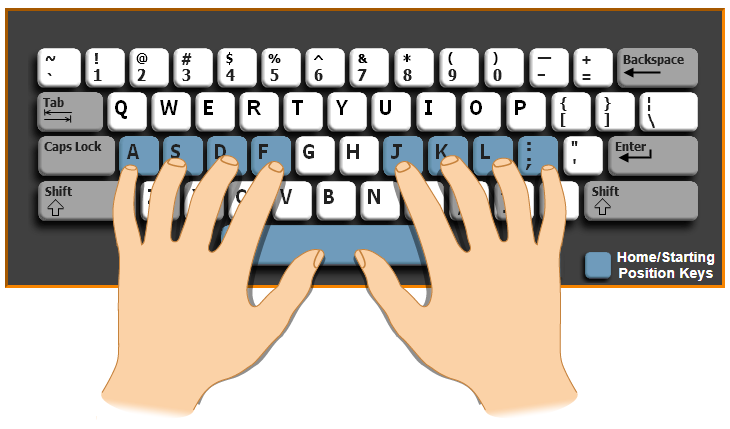
The Foundation of Real Speed Touch typing means using all ten fingers and typing without looking at the keyboard. It is the single most impactful change most self-taught typists can make. Most people who teach themselves to type develop habits that cap their speed, usually relying on two or four fingers and looking down frequently. Learning the proper finger placement unlocks speeds that are simply not possible with those habits.
The home row is your starting point: left hand on A S D F, right hand on J K L ;. Every other key is reached by moving from that home position and returning to it.
Focus on Accuracy Before Speed
This is the rule every typing instructor gives and it is the one most people ignore. Typing quickly and inaccurately trains your fingers to make the same mistakes faster. Typing slowly and accurately trains your fingers to get it right every time. Speed follows naturally once accuracy is consistent.
If your accuracy in a test is below 95%, slow down. Deliberately type at a pace where you make fewer errors, even if it feels uncomfortably slow. Within a few weeks of that discipline, your accurate speed will be higher than your inaccurate speed was before.
Practice Daily in Short Sessions
Ten to fifteen minutes every day produces dramatically better results than one long session per week. Typing is a motor skill it is stored in muscle memory, and muscle memory consolidates during rest between practice sessions. Daily repetition accelerates that consolidation.
Use the free tests on this site to build a consistent daily habit. Take three tests, note your WPM and accuracy, and stop. Doing more in a single sitting rarely produces additional gains.
Identify and Target Your Weak Keys
After every test, review your error pattern. Almost every typist has a small set of keys often numbers, punctuation, or uncommon letter combinations that account for the majority of their mistakes. Targeted practice on those specific keys improves your score faster than general practice.
Do Not Look at the Keyboard
This is harder than it sounds for self-taught typists with years of keyboard-looking habits. But it is non-negotiable for breaking through speed plateaus. Cover your hands if necessary. Slow down until you can find every key without looking. The temporary speed loss is recovered quickly once the habit breaks.
Benefits of Fast Typing Speed Skills
Better Productivity
Complete tasks faster and spend less time entering information.
Improved Academic Performance
Students can take notes, complete assignments, and prepare projects more efficiently.
Greater Career Opportunities
Many employers require typing skills for administrative, customer support, and data entry positions.
Enhanced Communication
Respond quickly to emails, messages, and online conversations.
Reduced Workload Stress
Efficient typing helps reduce repetitive effort and increases workflow efficiency.
Downloadable Typing Certificate
Earn a personalized typing certificate after completing your typing speed test.
Typing Speed Test for Every User Students, Job Seekers, Developers, and Professionals
TypingSkillsTest is used by people at every stage of their career and education. Here is how different users get value from regular typing practice:
- 🎓 For Students
Type faster, study smarter
Students type more than most people realize lecture notes, research papers, online exams, coursework submissions, and constant digital communication. A faster, more accurate typing speed translates directly into fewer hours spent on assignments and less cognitive load spent thinking about the mechanics of getting words onto a screen.
Most university students type between 40 and 60 WPM. Improving to 65–75 WPM can meaningfully reduce the time spent on written coursework. The 1-minute and 5-minute tests are ideal for student practice, and the downloadable typing certificate can be added to a student portfolio or CV.
- ✓ Complete assignments faster with less time per word
- ✓ Improve classroom productivity and note-taking speed
- ✓ Save time during research and online communication
- ✓ Increase confidence with digital learning platforms
Average benchmarks for academic use
Avg. Student WPM
Faster Essay Writing
- For Students
- Online Exams
- Research Papers
- Digital Classrooms
- 💼 For Job Seekers
Many employers include a typing assessment in their hiring process, particularly for administrative assistant, data entry, customer support, virtual assistant, transcription, and content writing roles. Showing up with a verified WPM score above the minimum requirement removes a barrier and signals that you take the role seriously.
Common employer minimum requirements: 40 WPM for general office roles, 60 WPM for admin and support positions, 70–80 WPM for data entry, and 80–100 WPM for legal or medical secretary positions. The 5-minute test most closely matches what employers use in their official assessments.
- ✓ Meet employer typing speed requirements with confidence
- ✓ Stand out in competitive admin and support roles
- ✓ Pass pre-employment typing assessments first time
- ✓ Improve your resume with a certified WPM score
Common roles with WPM requirements
- Data Entry Clerk
- Virtual Assistant
- Customer Support
- Admin Assistant
- Transcriptionist
- Content Writer
- 👨💻 For Programmers
Speed is not the most important variable in software development — but it is not irrelevant either. Developers spend a significant portion of their day typing: code, documentation, commit messages, pull request reviews, Slack messages, and emails. Faster, more accurate typing reduces friction in all of those activities.
More importantly, developers frequently type characters that everyday typists rarely practice: brackets, underscores, forward slashes, semicolons, and numbers. Standard typing tests using common words do not build familiarity with those characters. A coding-specific test mode is the most relevant practice format for developers.
- ✓ Write code and boilerplate more efficiently
- ✓ Navigate projects and switch contexts faster
- ✓ Reduce repetitive typos and syntax errors
- ✓ Improve overall productivity across your dev workflow
What fast coders look like
- Faster Code Review
- Better Documentation
- Quicker PR Comments
- Keyboard Shortcuts
- 📋 For Data Entry
Data entry is one of the few professional roles where typing speed is directly tied to output volume and output volume is directly tied to pay and employability. Employers in this field typically require 60 WPM as a minimum, with 80+ WPM preferred, and an accuracy standard of 98% or above.
That accuracy requirement is what makes data entry preparation different from general typing practice. Most typists focus on speed. Data entry professionals must focus relentlessly on accuracy under sustained, repetitive conditions. The 10-minute test is the most demanding and most relevant practice format for this purpose.
- ✓ Achieve high WPM scores required by top employers
- ✓ Maintain excellent accuracy across long sessions
- ✓ Deliver consistent performance under time pressure
- ✓ Build the attention to detail that gets you promoted
What employers expect from operators
- High WPM Score
- Excellent Accuracy
- Consistent Speed
- Attention to Detail
What Is a Good Typing Speed? WPM Benchmarks by Role
- 40–60 WPM
- 60–80 WPM
- 60–80 WPM
- 80–100 WPM
- 50–80 WPM
- 60–100 WPM
- 100+ WPM
Frequently Asked Questions
What is the average typing speed for adults?
The average typing speed for most adults is between 35 and 45 words per minute (WPM). People who type regularly for work — office staff, writers, customer support agents — often reach 60–80 WPM. Professional typists who specifically train their speed can exceed 100 WPM. If you score in the 35–45 WPM range, you are right at the average. If you score above 60 WPM, you are faster than most adult computer users.
What is considered a good typing speed?
A typing speed of 50–70 WPM with 95% or higher accuracy is generally considered good for most purposes. Above 80 WPM puts you in roughly the top 25% of all keyboard users. Above 100 WPM is elite-level — fewer than 5% of typists reach that consistently. “Good” is also relative to your goal: 45 WPM is fine for personal use, but may not meet the minimum for many office roles.
How is WPM calculated?
WPM is calculated by taking the total number of correctly typed characters, dividing by 5 (the standard word unit), and then dividing by the number of minutes the test lasted. Only correct characters count. Errors reduce your net WPM score. Paused time is excluded from the calculation.
Is TypingSkillsTest free?
Yes — completely free. Every typing test, every test mode, and the downloadable certificate are all free to use without creating an account. There are no paid tiers, no trials, and no feature gates.
Can I download a typing speed test certificate?
Yes. After completing any test, click the certificate button, enter your name, and download a
personalized typing certificate as a PDF or PNG. The certificate shows your WPM, accuracy, test
duration, mode, and the date. It is suitable for job applications, academic portfolios, and LinkedIn
profiles.
Does the test work on a phone or tablet?
Yes. TypingSkillsTest is fully mobile-responsive and works on any device with a browser. For the most accurate WPM measurement, use a physical keyboard. Touchscreen typing naturally produces lower WPM scores because touchscreen input is slower than physical keyboards for most people.
How often should I practice typing to improve?
Daily practice of 10–15 minutes produces faster improvement than occasional long sessions.
Typing is a motor skill — muscle memory builds through consistent repetition over time. Practicing
the same amount spread across 7 days produces better results than practicing 7 times as much in one
session.
What typing speed do employers look for?
Requirements vary by role. General office and administrative positions typically require 40–60
WPM. Data entry roles usually require 60–80 WPM with 98%+ accuracy. Legal and medical
secretaries are expected to type at 80–100 WPM. Customer support and virtual assistant roles
typically require 45–60 WPM. Always check the specific requirement in the job description —
some employers state a minimum, others use the typing test as one factor among many.
Start Your Free Typing Speed Test Right Now
Your WPM score is waiting. It takes less than 60 seconds to find out how fast you type no registration, no payment, no friction. Click start, type the passage, and see your real typing speed test, accuracy, and consistency instantly. If you want to use your result professionally, download your personalized typing certificate when the test finishes. It is free, instant, and ready to share.
Not sure which test to take? The 1-minute test is the best starting point for most people. Start the 1 minute typing test →