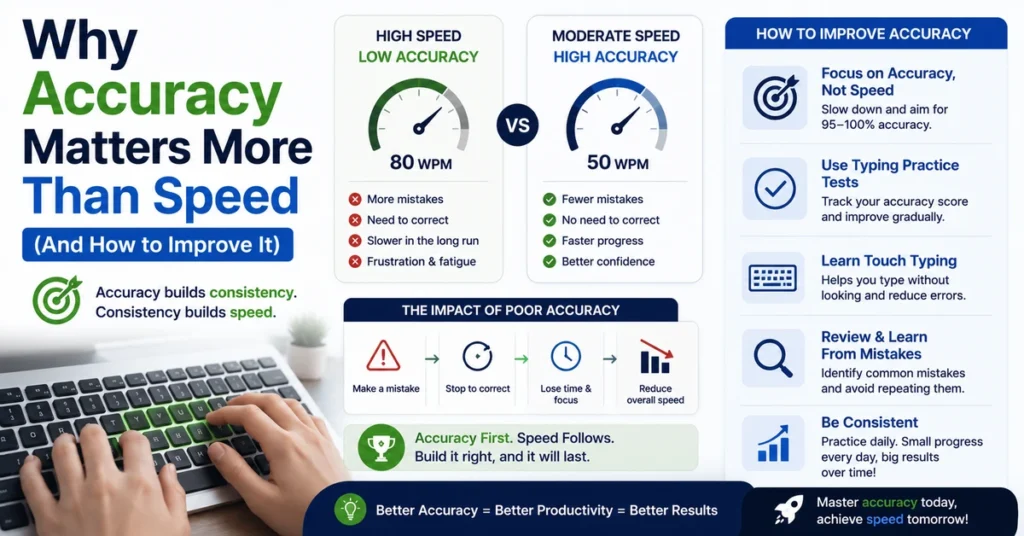
How to Calculate Typing Accuracy: Formula, Examples & Free Tool
Your WPM score only tells half the story. How to calculate typing accuracy — and understanding what that number actually means — is just as important, because a fast result full of mistakes isn’t a reliable measure of real typing skill.
This guide walks through the typing accuracy formula, worked examples, what counts as an error, how accuracy interacts with your WPM, and how to check your score instantly.
The Typing Accuracy Formula
The standard typing accuracy formula is:
Typing Accuracy = (Correct Characters ÷ Total Characters Typed) × 100This gives you a percentage that reflects how much of what you typed matched the original text exactly. It’s a simple ratio, but the details of what counts as “correct” and “total” can vary slightly between tools, which is why comparing accuracy scores across different typing platforms isn’t always a perfectly apples-to-apples comparison.
Worked Examples
Example 1: You type 400 characters and 380 are correct.
380 ÷ 400 × 100 = 95% accuracyExample 2: You type 600 characters and 550 are correct.
550 ÷ 600 × 100 = 91.6% accuracyExample 3: You type 250 characters with zero mistakes.
250 ÷ 250 × 100 = 100% accuracyExample 4: You type 1,200 characters over a 5-minute test and make 60 errors.
(1200 − 60) ÷ 1200 × 100 = 95% accuracy| Total characters | Correct characters | Errors | Accuracy |
|---|---|---|---|
| 500 | 500 | 0 | 100% |
| 500 | 485 | 15 | 97% |
| 500 | 460 | 40 | 92% |
| 500 | 425 | 75 | 85% |
| 500 | 400 | 100 | 80% |
What Counts as a Typing Error?
Not every mistyped key affects accuracy in the same way. Typical error categories include:
- Incorrect characters — typing the wrong letter, number, or symbol
- Missing characters — skipping a letter entirely
- Extra characters — typing something not in the original text
- Capitalization errors — typing lowercase where a capital was required, or vice versa
- Punctuation mistakes — wrong or missing commas, periods, apostrophes
- Transposed characters — swapping the order of two adjacent letters, a very common error type in fast typing
Some tools distinguish between corrected errors (mistakes you fixed with Backspace before finishing) and uncorrected errors (mistakes left in the final text). Corrected errors mainly cost you time and reduce your net WPM; uncorrected errors directly lower your accuracy percentage. Our guide to how typing speed is calculated breaks down how these interact with your WPM score.
Why the Same Passage Can Produce Different Accuracy Scores
It’s common to retype the same passage twice and see two different accuracy percentages, even without consciously typing better or worse the second time. A few reasons this happens:
Familiarity effects. Once you’ve seen a passage, your brain partly predicts upcoming words, which can raise accuracy simply through repetition rather than genuine skill improvement.
Fatigue. Accuracy tends to drift downward the longer a test runs, especially past the 3–5 minute mark, as concentration and finger precision both decline slightly.
Text difficulty. A passage full of uncommon words, numbers, or symbols will typically produce lower accuracy than one built from simple, familiar vocabulary — even for an identical skill level.
This is why taking a single test and treating the accuracy result as a fixed, permanent number can be misleading. An average across three or more attempts is a more reliable figure.
Why Accuracy Percentage Can Be Misleading at First Glance
A 90% accuracy score sounds like a strong grade, but in typing terms it means roughly one in every ten characters is wrong — which, given the five-character standard word unit, can work out to an error in almost every second word. That’s why most typing benchmarks treat 95%+ as the realistic target for everyday competent typing, and 98%+ as strong professional-level accuracy.
| Accuracy range | What it generally indicates |
|---|---|
| Below 90% | Technique needs foundational work |
| 90–94% | Developing, focus on repeated errors |
| 95–97% | Solid, dependable accuracy |
| 98–100% | Strong, professional-level accuracy |
For a deeper breakdown of why this matters more than raw speed, see why typing accuracy matters more than speed.
How Accuracy Affects Your Net WPM
Most typing tests, including ours, don’t report speed and accuracy in isolation — they combine them into a net WPM score that penalizes errors. That’s why two typists with the same raw speed can end up with very different final scores if one makes significantly more mistakes.
Illustrative comparison:
| Typist | Gross WPM | Accuracy | Approximate Net WPM |
|---|---|---|---|
| A | 75 | 88% | ~66 |
| B | 62 | 98% | ~61 |
Typist A types faster in raw terms, but the accuracy gap narrows the practical difference significantly once errors are subtracted. If you want the full mechanics of how errors reduce net WPM, read How Is Typing Speed Calculated?
Common Mistakes When Estimating Typing Accuracy by Hand
If you’re trying to check accuracy manually rather than using a calculator, a few mistakes are worth avoiding:
- Forgetting to count spaces and punctuation as characters, which can inflate an accuracy estimate
- Only counting obvious errors while missing subtle ones like a doubled letter or an extra space
- Comparing against the wrong source text, especially after edits or corrections mid-test
- Rounding too early in multi-step calculations, which compounds small errors into a noticeably wrong final percentage
This is part of why most people default to an automated calculator rather than counting characters manually — the process is simple in theory but easy to get slightly wrong by hand, especially over longer passages.
How to Improve Your Typing Accuracy
Improving accuracy is less about trying harder and more about specific, targeted practice:
- Slow down by roughly 10–15% during dedicated accuracy practice sessions.
- Identify your specific weak keys rather than treating every mistake as random — most typists have two or three recurring problem keys.
- Practice realistic text that includes capitals, punctuation, and numbers, not just simple lowercase words.
- Use consistent finger placement, so the same key is always reached by the same finger. See our Keyboard Finger Placement Guide.
- Finish tests instead of restarting after an early mistake, so you practice recovering rather than only ever typing the easy opening lines.
Our complete guide on why typing accuracy matters includes a full 15-minute practice routine if you want a structured plan.
How to Check Your Accuracy Instantly
Rather than counting characters manually, you can get an instant, automatically calculated accuracy percentage — along with WPM, CPM, and a full error breakdown — using our Typing Accuracy Calculator. Take a test at any duration from 15 seconds up to 10 minutes and your results appear the moment you finish.
Frequently Asked Questions
What is a good typing accuracy percentage? 95–97% is a solid target for developing typists, and 98%+ is generally considered strong, professional-level accuracy.
How is typing accuracy different from WPM? WPM measures how fast you type; accuracy measures how much of what you typed was correct. A fast result with low accuracy usually reflects real-world output worse than a moderately paced, highly accurate one.
Do corrected mistakes count against my accuracy? It depends on the tool. Many typing tests only count uncorrected mistakes (errors left in the final text) toward your accuracy percentage, while corrected mistakes mainly cost you time.
Can I improve my typing accuracy quickly? Slowing down slightly, practicing weak keys individually, and typing realistic text with punctuation and numbers are the fastest ways to raise accuracy. See our full accuracy improvement guide for a complete routine.
Is 100% accuracy necessary? No. Consistently hitting 96–99% while maintaining a reasonable speed is generally more useful than slowing down excessively to chase a perfect score on every attempt.
Why does my accuracy drop on longer tests? Fatigue and reduced concentration tend to increase errors the longer a test runs, especially past the 3–5 minute mark. This is normal and is one reason longer tests are considered more representative of real-world performance.
Can I calculate accuracy without an online tool? Yes, using the formula above — count your correct and total characters and divide — but it’s easy to make small counting errors by hand, especially on longer passages, so an automated calculator is generally more reliable.
Related Reading
- Why Typing Accuracy Matters More Than Speed
- How Is Typing Speed Calculated? Proven WPM Formula, No Confusion
- Common Touch Typing Mistakes and How to Fix Them