
How Our Typing Speed Test Works
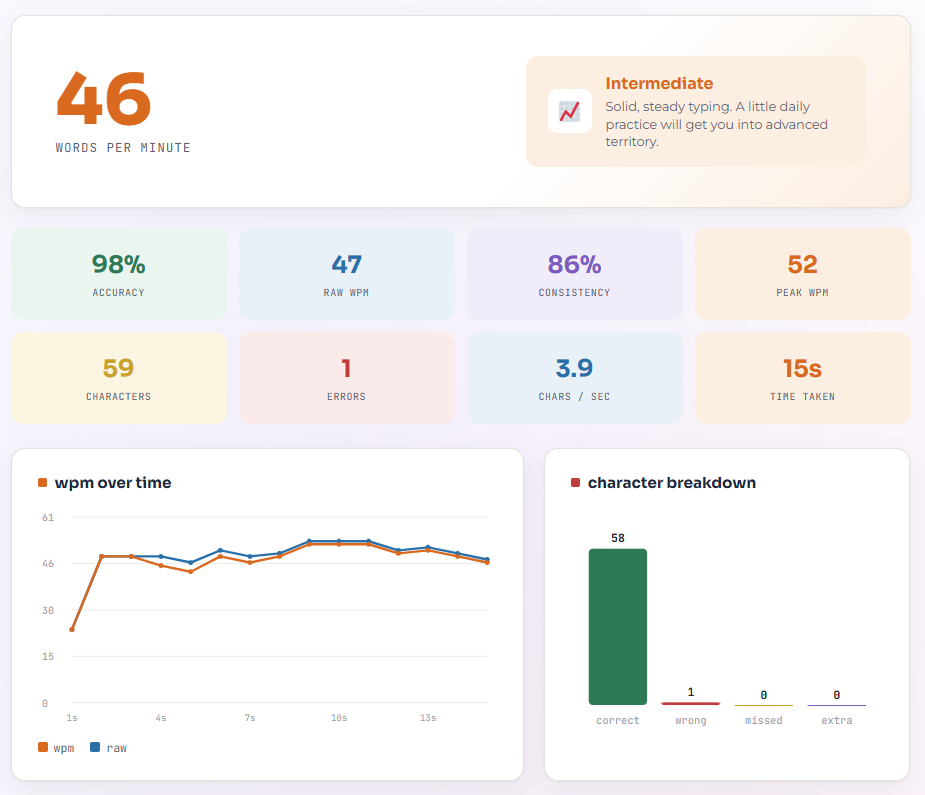
Our online typing speed test measures how quickly and accurately you type. The tool records your typing performance in real time and provides results such as words per minute, accuracy, characters per minute, errors, and correct words.
You do not need to create an account or download any software. Select a test duration, begin typing, and receive your results when the timer ends.
How to Take the Typing Speed Test
1. Select a Test Duration
Choose how long you want the test to run. Available options may include:
- 15 seconds
- 30 seconds
- 1 minute
- 2 minutes
- 3 minutes
- 5 minutes
- 10 minutes
A one-minute test is useful for a quick typing speed check. A three-minute or five-minute test can provide a more consistent measurement of your typing performance.
2. Choose a Typing Mode
Select the type of text you want to type. Depending on the available options, you may choose:
- Common words
- Sentences
- Paragraphs
- Numbers
- Punctuation
- Difficult words
Each mode tests a different typing skill. A basic word test focuses mainly on speed, while sentences and paragraphs provide a more realistic test of accuracy, punctuation, spacing, and capitalization.
3. Start Typing
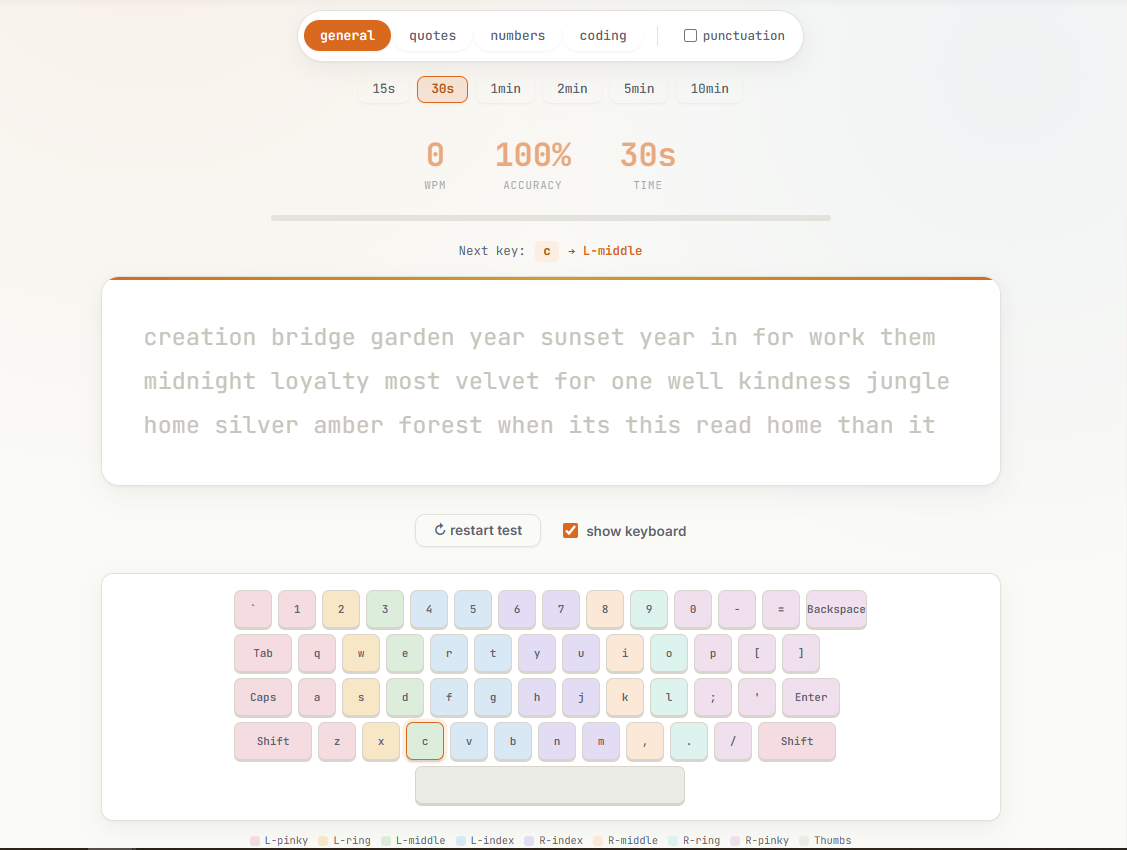
Click or tap inside the typing area and begin typing the displayed text.
The timer starts automatically when you press the first key. You do not need to click a separate start button.
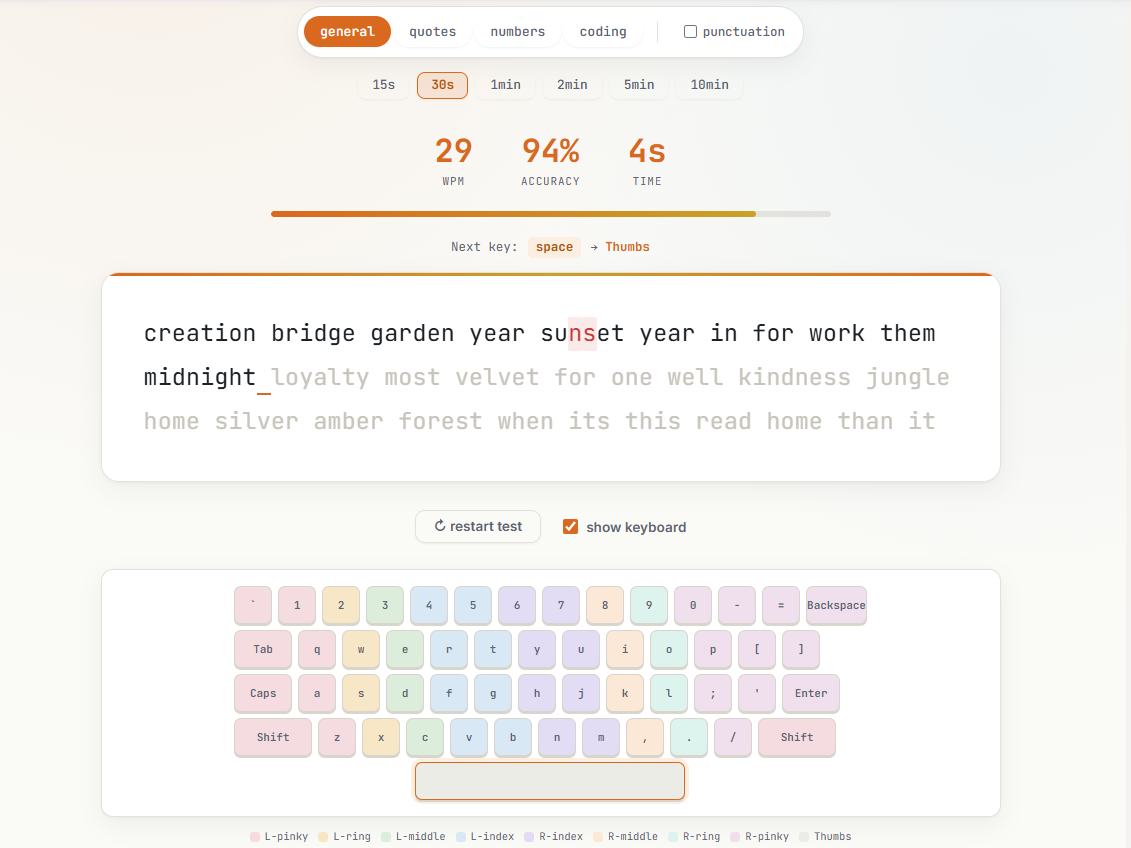
The current character or word is highlighted to help you follow the text. Correctly typed characters are marked differently from incorrect characters so you can identify mistakes while the test is running.
4. Continue Until the Timer Ends
Type as quickly and accurately as possible until the selected time is complete.
During the test, the tool may display live information such as:
- Current WPM
- Typing accuracy
- Number of errors
- Remaining time
You can correct mistakes by using the Backspace key when corrections are enabled. Correcting an error takes additional time, so it can affect your final typing speed.
5. Review Your Results
When the timer reaches zero, the test stops automatically and your complete typing report is displayed.
You can then restart the test, choose another duration, or practise again to improve your result.
What Does the Typing Test Measure?
Words Per Minute
Words per minute, or WPM, is the main measurement used to calculate typing speed.
For typing tests, one standard word is normally counted as five characters. These characters may include letters, numbers, spaces, and punctuation marks.
The basic formula is:
WPM = Total Typed Characters ÷ 5 ÷ Test Time in Minutes
For example, if you type 250 characters in one minute:
250 ÷ 5 = 50 WPM
This is your raw typing speed before any error adjustments are applied.
Raw WPM
Raw WPM measures your total typing speed without fully considering mistakes. It shows how quickly you entered characters during the test. A high raw WPM with many mistakes does not necessarily represent effective typing performance.
Adjusted WPM
Adjusted WPM considers typing errors when calculating your final result. The exact adjustment depends on the tool’s scoring system. A common approach is to subtract uncorrected errors from the raw typing score. This provides a more balanced result because it considers both speed and accuracy.
Typing Accuracy
Typing accuracy shows the percentage of characters or words you typed correctly.
The basic calculation is:
Accuracy = Correct Characters ÷ Total Typed Characters × 100
For example, if you type 200 characters and 190 are correct, your accuracy is 95%.
A strong typing result should combine good speed with high accuracy. Typing very quickly with frequent errors can reduce your final performance score.
Characters Per Minute
Characters per minute, or CPM, shows how many characters you typed during one minute. Unlike WPM, CPM counts individual characters rather than converting them into standard five-character words.
Correct Words
Correct words are words that match the displayed text exactly. The spelling, capitalization, spacing, and punctuation must be correct where applicable.
Incorrect Words
Incorrect words contain one or more mistakes. A word may be marked incorrect because of:
- A missing letter
- An extra letter
- An incorrect letter
- Incorrect capitalization
- Missing punctuation
- An unwanted space
Typing Errors
The tool records mistakes made during the test. Errors may include:
- Incorrect characters
- Missing characters
- Extra characters
- Misspelled words
- Incorrect spaces
- Punctuation mistakes
Corrected and uncorrected errors may be shown separately in the final report.
Typing Consistency
Typing consistency shows how steadily you typed throughout the test.
A consistent typist maintains a relatively stable speed instead of typing very quickly for a few seconds and then slowing down significantly.
Your consistency score may be based on changes in your WPM during different parts of the test.
When Does the Timer Start?
The timer begins when you type the first character.
Selecting a test duration or clicking inside the typing box does not start the countdown. This gives you enough time to review the text and position your hands before beginning.
What Happens When You Make a Mistake?
When you enter an incorrect character, the tool marks it as an error.
Depending on the selected test settings, you may be able to:
- Correct the mistake using Backspace
- Continue typing without correcting it
- Move to the next word
- Restart the test
Correcting a mistake may improve your accuracy, but the time used to make the correction can lower your WPM.
How to Get a More Reliable Result
For a more consistent typing speed result:
- Use a physical keyboard.
- Sit in a comfortable position.
- Keep both hands on the keyboard.
- Avoid looking at the keys.
- Choose a quiet environment.
- Do not copy and paste the displayed text.
- Complete more than one test.
- Try a three-minute or five-minute test.
Your WPM may change slightly between tests because of text difficulty, concentration, keyboard type, fatigue, and familiarity with the words.
Taking three tests and comparing your average result can provide a more dependable estimate of your typing ability.
Start Your Typing Speed Test
Select a duration and start typing to check your current WPM, accuracy, CPM, errors, and overall typing performance.
